Getting it
V2 is downloadable from the members area by anyone with a ShareMaster account, including a free Community account. It installs beside V1, so nothing you rely on is replaced.

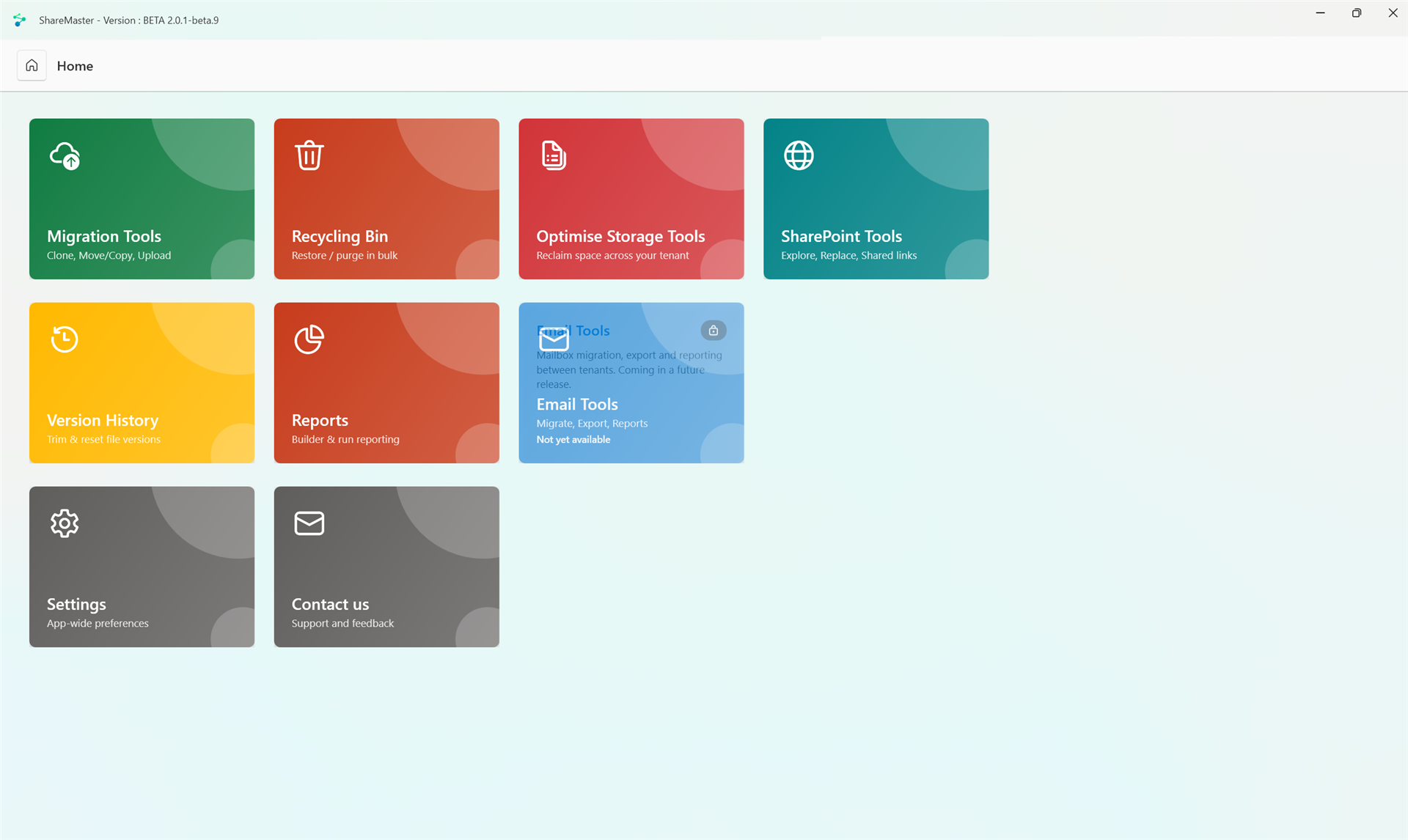
V2 left beta with version 2.0.1, its first stable release.
V2 is downloadable from the members area by anyone with a ShareMaster account, including a free Community account. It installs beside V1, so nothing you rely on is replaced.
V2 updates itself when a new version is published. If you installed a V2 beta, it moves across to the release automatically, with nothing to reinstall.
Unchanged. It installs, licences and updates exactly as it does today.
Everything listed here is in the V2 you can download today.
Move files nobody opens into Azure Blob Storage you own, leaving a working link in the library. The item keeps its ID, version history, metadata and permissions, and a click brings the file back.
V1 migrates SharePoint to SharePoint. V2 keeps that and adds two more routes: upload a folder from your PC into a library, and download a library back down to your PC.
Export Office 365 mailboxes to PST, move mailboxes from one Office 365 tenant to another with their online archives, or import from PST, IMAP or POP3 into Office 365.
An inventory report giving one worksheet per list and library as its default view, a folder inventory with sizes and file counts per folder, an empty-folder report, and an image-size report showing what shrinking images would save.
The storage tools report first and act second. Every clean-up has a report-only mode that shows you exactly what would be removed, from the same scan the real run uses.
SharePoint blocks queries that scan past 5,000 items, which is where bulk tools usually fall over. Every list read in V2 goes through one enumerator that falls back through three strategies until one gets the rows, so a 200,000-item library reads the same as a small one.
Built around throttling, not patched for it. A 503 from Microsoft 365 pauses every job in the app and resumes when it clears, a 429 backs off the affected account only, and runs are checkpointed, so stopping one and picking it up later does not re-copy what already moved.
The installer is code-signed and V2 checks for new builds on its own, so you get each new version without coming back here for it.
V2 signs in with your existing ShareMaster account and reads the plan you already hold. Nothing to re-buy, no key to move across.
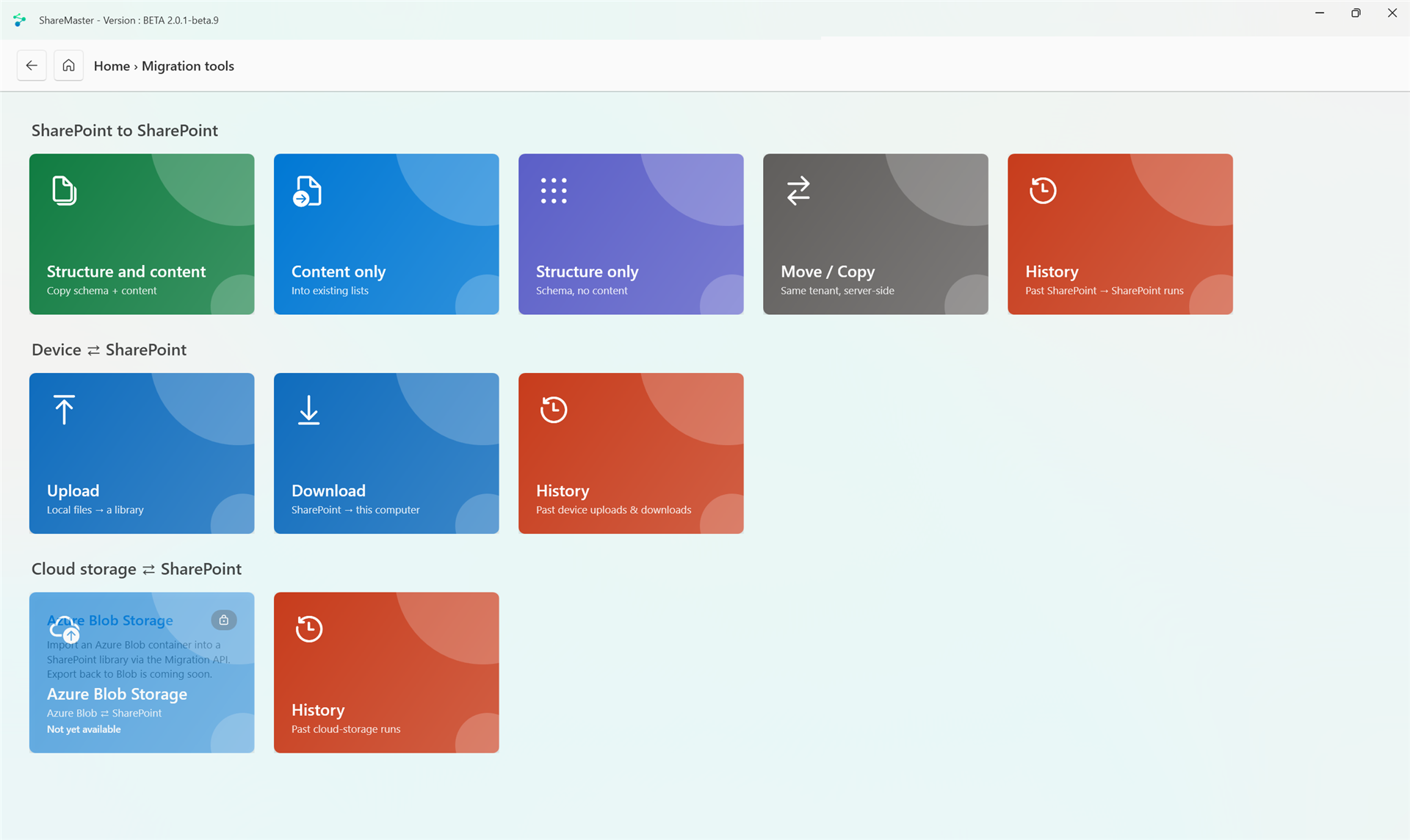
The migration tools in V2, captured from an earlier beta build.
SharePoint is the most expensive place you can keep a file nobody opens. Archiving copies those files out to Azure Blob Storage in your own subscription and leaves a working link behind, so the library still looks and behaves like the library.
ShareMaster provisions the storage account and a small endpoint in your own Azure subscription, and registers the two placeholder file types with SharePoint. Nothing runs on our infrastructure and no content passes through us.
Pick sites, libraries or folders and filter down to what has not been touched. The run reports before it acts, so you see what would move, and how much SharePoint storage it would free, before anything does.
The bytes go to your Blob container and the library item is replaced in place with a small placeholder. Item ID, version history, metadata, people columns and unique permissions all survive the swap.
Each run chooses what a click on its placeholders does: download the original, or put the file back into the library in place. A click keeps the file's Created and Created By; Modified and Modified By show the click. Restore Archived Files, run from ShareMaster, brings whole libraries back with all four kept.
A placeholder is an identifier, not a permission. Clicking one signs the person in and checks they can read the live SharePoint item before it hands over anything, and a restore writes to SharePoint as that person rather than as a service identity. Someone who cannot open the file cannot open the archive, and revoking their access to the item revokes their access to the archived copy with it.
The storage is yours. The Blob account, the subscription, the identities and the billing all sit in your tenant, which means your retention rules and your negotiated Azure rate, not ours. It also means the archived bytes are not governed by SharePoint any more: retention, DLP, eDiscovery and search apply to the live item and the placeholder, not to the copy in Blob. That trade is the point of the feature, and you should make it deliberately.
Per-file progress while it works, and a history written as the run goes rather than at the end. If a run is interrupted - a crash, a closed laptop, a stop - the history says so and offers Resume, which picks up the files that had not been converted yet instead of starting again.
Both placeholder types have been proven end to end against a live tenant: archive, click, download, and restore back into the library. The part still being finished is first-run setup on a brand-new tenant, so getting the first customer tenant configured is something we currently do with you rather than something the wizard does alone.
Only the differences are listed. Migration between SharePoint sites and tenants, same-tenant move and copy, the advanced recycling bin, version trimming, find and replace, and the sharing link finder all work the same in both, so they are not here.
| Capability | V1 (ships today) | V2 |
|---|---|---|
| The app itself | Web interface hosted inside an embedded browser | Complete rebuild as a native Windows app: live per-item progress while a run works, and pause, minimise or cancel without losing the run |
| Upload from your PC into a library | Not available | Yes |
| Download a library to your PC | Not available | Yes |
| SharePoint archiving | Not available | Archive cold files to Azure Blob Storage you own, leaving a clickable placeholder in the library that downloads or restores the original |
| Inventory reporting | Export File List report | One worksheet per list and library, using the columns of its default view |
| Folder-level storage | Site and tenant storage totals | Per-folder sizes and file counts, empty folders included |
| Empty folder clean-up | Remover only | Report first, then the remover |
| Image reduction | Reducer only | Size report first, then the reducer |
| Duplicate files | Report only | Report first, then remove the extra copies |
| Email migration | Not available | Office 365 to PST, Office 365 to Office 365 with online archives, and PST, IMAP or POP3 into Office 365 |
| Custom report builder | Available | Not yet: the rebuilt relational builder is in the app but switched off until it is finished |
| Sign-in | Embedded browser session | Microsoft's own sign-in library, holding tokens rather than a captured browser session |
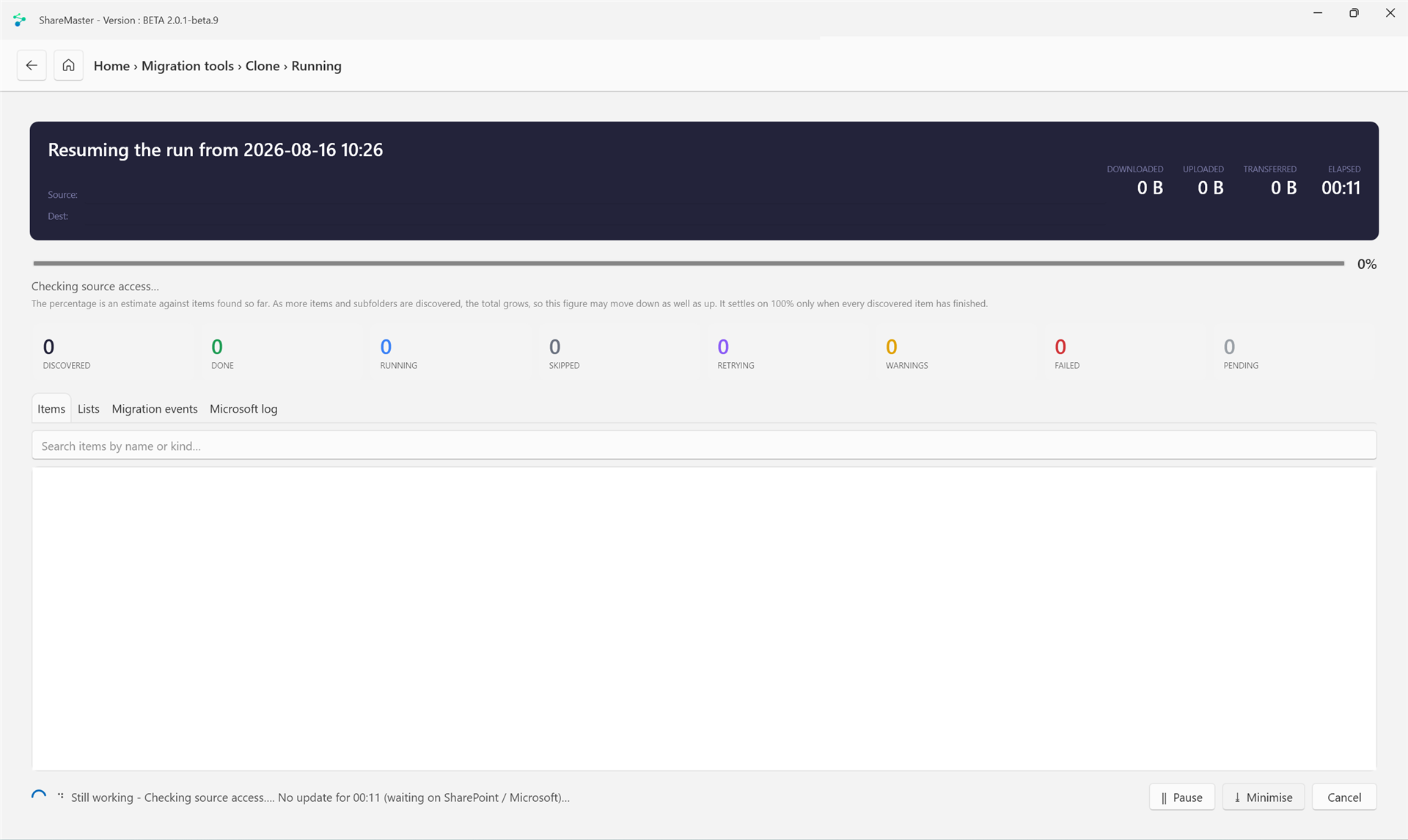
A run picking up where it left off. The counters update as it works, the status line says what it is waiting on rather than going quiet, and pause, minimise and cancel are there throughout. Source and destination are blanked out here: it is a real customer migration.
Mailbox export and import are switched on in V2, on the Email Tools menu.
Export mailboxes out of a tenant to PST files on your machine, for archiving, handover or a tenant you are shutting down. Export just your own mailbox, or sign in as an admin for the whole tenant. Needs Outlook installed.
Move mailboxes from one tenant straight into another. Sign into both, match the mailboxes up, then import. Online archives can come across as rows of their own.
Import old PST files, or mail from any IMAP or POP3 host, into Office 365 mailboxes, so it ends up somewhere people can actually search it. Only the PST route needs Outlook.
What each email route carries, and what it does not yet, is set out on the Office 365 email migration page, and the email migration guide walks through every screen.
Two cloud connectors are in V2 too. Dropbox to SharePoint imports a Dropbox account, or a whole Dropbox team, into SharePoint libraries. Azure Blob Storage copies SharePoint files into a container you own, with their dates and authors recorded on each blob, and copies a container back into a SharePoint library. Duplicate file removal is in V2 as well: run the report, then keep one copy and clear the rest. The custom report builder (relate lists by lookup column or by hand, then export the joined result) is the one thing V1 does that V2 does not do yet; it is in the app reading "Coming soon" until it is finished. Every other report listed above works today. See the roadmap for what is next.
V2 lives in the members area. Sign in with your ShareMaster account and it is on the left-hand menu. Your existing licence carries across.